What's new
What's new in July 2026
Everything we shipped to BoardPal in July 2026.
Jul 8 to 14 · 16 updates
13Jul · Mon
Less repetition in practice
ImprovedNew- Improved
Practice sets space out look-alike questions from the same topic. more ▾less ▴
Mixed and section practice now space out questions from the same topic, so you're much less likely to see several look-alike items in a row. We also rewrote a group of surgery questions that were worded too similarly.
- New
Press 1 to 4 to pick an answer and Space to submit. more ▾less ▴
Keyboard shortcuts for questions (handy on a laptop or an iPad with a keyboard): press 1, 2, 3, or 4 to pick a choice, and Space to submit your answer or move to the next question — the same feel as the flashcards.
- Improved
Pen modes moved to Q W E R T so the number keys always pick answers. more ▾less ▴
So the number keys always choose your answer, the pen tool's mode shortcuts moved to a row of neighboring keys — Q W E R T (underline, encircle, box, freehand, eraser, left to right). Each pen button's tooltip shows its key.
- Improved
12Jul · Sun
Daily study reminders
New- New
Opt-in daily notification at your usual study time, with today's plan. more ▾less ▴
BoardPal can now remind you when it's time to study — a real notification on your phone, once a day, with your plan's tasks for the day. Turn it on in Profile → Study preferences. "Auto" learns the hour you usually study and nudges you then, or pick a fixed time; if you've already studied that day, we stay quiet. Works on Android right away; on iPhone, add BoardPal to your Home Screen first (Share → Add to Home Screen).
- New
Add BoardPal to your Home Screen for a full-screen app experience. more ▾less ▴
BoardPal is now installable as an app: add it to your Home Screen and it opens full-screen with its own icon, no browser bar. On Android, Chrome will offer "Install app" from its menu; on iPhone, use Share → Add to Home Screen.
Photos in support messages, plus our Refund Policy
New- New
Attach a receipt or a screenshot to your support message. more ▾less ▴
When you message support, you can now send a photo with it — your payment receipt, or a screenshot of whatever looks wrong on your screen. Tap "Attach a photo" in the support box (any image up to 10 MB). Only our team can see what you send.
- New
Our Return & Refund Policy is now published in the footer. more ▾less ▴
Our Return & Refund Policy is now published — it explains plainly when a refund applies and how to ask for one. You'll find it in the site footer, beside our Terms of Service and Privacy Policy.
- New
11Jul · Sat
Timed practice sessions
New- New
Optional timer for Exam-mode practice — board pacing, auto-submits at zero. more ▾less ▴
Exam-mode practice can now run against the clock. Turn on "Timed session" when you set up an Exam-mode set and you get 72 seconds per question — the same pacing as the board's 100 items in 2 hours. The countdown pauses whenever you leave the screen, and your answers are submitted automatically when it reaches zero.
The Scratch pad comes to flashcards
New- New
The Scratch pad is now in flashcard review too. more ▾less ▴
Flashcard review now has the Scratch pad too — the same working space from practice and mock boards, for drug computations, mnemonics, or anything you want to jot mid-review. Tap the pill next to the deck name (or press S on a keyboard) to slide it up; whatever you draw or type stays for the whole session, even while the pad is closed.
Answer review: focus on what you missed
New- New
Filter Answer review down to just your missed questions. more ▾less ▴
Answer review now has a Missed only filter — one tap hides everything you got right, so you can go straight to the questions that need your attention. It works after practice sets, mock boards, and the diagnostic.
Scratch pad — plus freehand drawing for everyone
NewImproved- New
A Scratch pad for computations — like exam-day scratch paper. more ▾less ▴
A Scratch pad now sits next to the exam tools in practice, mock boards, and the diagnostic — your working space for dosage computations, patho maps, and quick notes, just like the scratch paper you get on exam day. It slides up over the question, keeps everything you write for the whole session (even while closed), and has its own eraser, undo, and clear.
- Improved
Pen upgrade: Freehand for every device + an Eraser mode. more ▾less ▴
The pen now has five modes: underline, encircle, box — and new Freehand and Eraser. Freehand lets you write and draw right on the question text with any finger, mouse, or stylus (no stylus required anymore), and the eraser removes any pen mark you tap or sweep across.
- Improved
A one-time note points out the exam tools on your first question. more ▾less ▴
First time in the warm-up or practice? A small one-time note now points out the exam tools so you can try them from your very first question — it steps aside the moment you use any tool.
- Improved
Keyboard shortcuts for the highlighter, pen, and scratch pad. more ▾less ▴
On a computer, the exam tools now have keyboard shortcuts: H highlighter, P pen, 1–5 pen modes, S scratch pad, C clear, Esc to put a tool away. Each tool's tooltip shows its key.
- New
Scratch pad now has a Type tab for typed notes. more ▾less ▴
Prefer typing to finger-writing? The Scratch pad now has Draw and Type tabs — Type is a clean space for typed notes and computations, kept for your whole session just like the drawings. Thank you to the student who asked for this!
New pen tool — underline, encircle, or box the key words
New- New
A pen next to the highlighter: underline, encircle, or box key words. more ▾less ▴
Next to the highlighter there's now a pen. Pick a shape — underline, circle, or box — then press and drag across any words in a question or situation to mark them, the way you would with a real pen on exam day. Tap a mark to erase it; marks clear when you move to the next question. Thank you to the student who suggested this!
- New
Stylus users can write and draw freely on the question text. more ▾less ▴
Using a tablet with a stylus? With the pen on, you can write and draw freely right on the question text — and scrolling with your finger still works everywhere else on the page, so you'll never draw by accident.
- New
10Jul · Fri
Clearer rationales on every question
Improved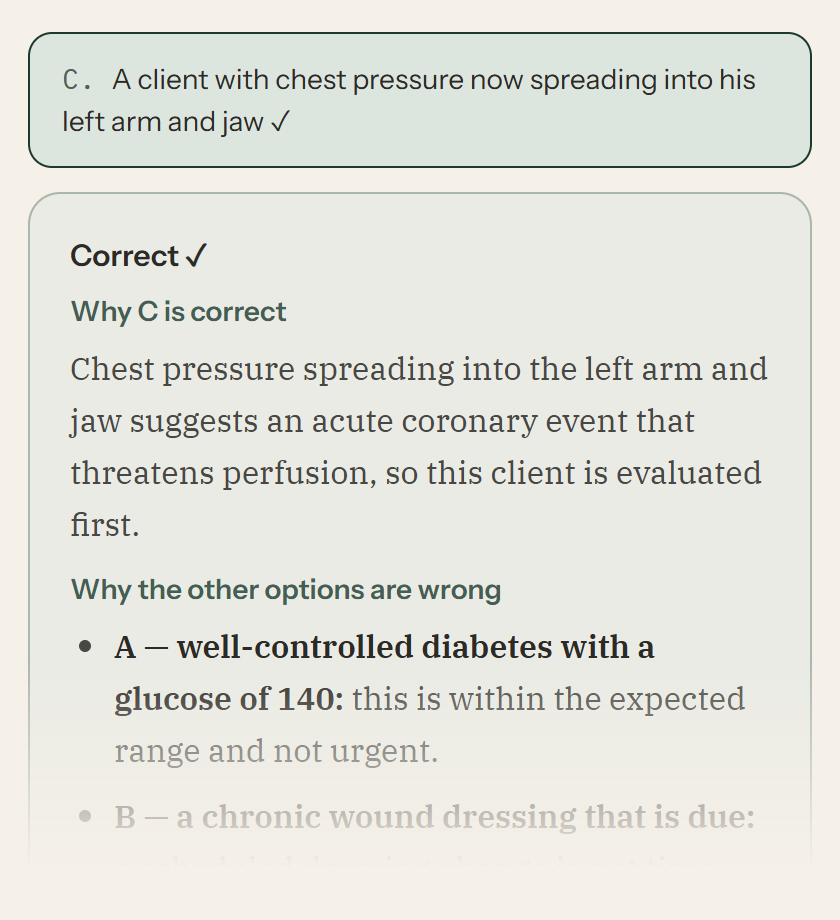
- Improved
Why the answer is right — then each wrong option explained, one by one. more ▾less ▴
Every rationale now follows one clear shape: first, why the correct answer is right — then “Why the other options are wrong”, taking each choice in turn and naming exactly what it is or when it would be the right pick. No more digging through one long paragraph after a tough question. Thank you to the students whose reports sparked this!
- Improved
Every question included — practice, all five mock boards, and the diagnostic. more ▾less ▴
This covers everything: all 11,800+ questions across practice, all five mock boards, and the diagnostic. Each rewrite was checked against the original so the facts — and the correct answers — stayed exactly as verified.
The right emails at the right time
NewImproved- New
Welcome, receipt, renewal heads-up, and exam-week checklist emails. more ▾less ▴
BoardPal now sends the emails that matter: a welcome when you join, a receipt when your payment is approved, a heads-up before your access ends, and an exam-week checklist two days before your boards. Each one exists so you never miss something important — nothing noisy.
- Improved
Day 1 of a new plan now ends with real questions answered. more ▾less ▴
Day 1 of a new study plan now pairs the intro lessons with a lighter first topic, so your first day ends with real questions answered — not just reading.
- Improved
Plans & Pricing previews the official plans arriving after beta. more ▾less ▴
Plans & Pricing now previews the official plans that arrive after beta, so you can see where BoardPal is headed. Beta access stays the same one-time ₱350 while spots last.
- Improved
Mock Boards 1 and 2 got a question-by-question quality pass. more ▾less ▴
Mock Boards 1 and 2 got a question-by-question quality pass — clearer stems and tighter answer choices — part of our ongoing question review.
Flashcards: pick your own mix of topics
NewImproved- New
Build flashcard sessions from any mix of topics you choose. more ▾less ▴
The Flashcards page now has a “Choose topics” builder — tick any mix of decks, a whole subject in one tap or single decks across subjects (Pedia + OB, say), and review just those. It remembers your last picks for next time.
- Improved
Cleaner deck library with search. more ▾less ▴
The deck library is easier to scan: compact rows, subjects collapsed with their due counts on top, and a search box so you can jump straight to a deck like “insulin” or “labor”.
- Improved
9Jul · Thu
Change your rest days anytime
New- New
Add or change rest days on your plan and it rebalances around them. more ▾less ▴
You can now change your rest days right from the Study Plan page — no need to reset and rebuild. Pick a preset or your own days, hit Save, and your unfinished topic work respreads around them automatically. Everything you've already completed stays exactly where it is.
Study plans now fit your days
Improved- Improved
Plans are sized to about 4 hours a day — no more impossible days. more ▾less ▴
New study plans are built around a realistic daily budget of about four hours. A shorter timeline now means fewer questions per topic — never a skipped topic — instead of impossible 200-question days. Mock boards scale with your plan length too (a two-week plan gets one final benchmark instead of ten days of mocks), and the day before your exam always stays light: just your mistakes, then rest.
- Improved
Task time estimates are now honest, based on real answering pace. more ▾less ▴
Time estimates across the app are now calibrated to how long questions and flashcards really take our students. Some tasks will show a longer estimate than before — nothing got longer, the number just got honest.
- Improved
Existing plans are untouched, with a one-time offer to rebalance. more ▾less ▴
Plans you already built are not changed. If yours came from before this update, you'll see a one-time offer on the Study Plan page to rebalance it to the new pacing — everything you've completed carries over, and your old plan stays restorable.
Rebuilt your study plan by mistake? Undo it
New- New
Replaced your study plan by accident? You can now restore it. more ▾less ▴
Building a new study plan (or tapping Reset) no longer means losing your old one — the previous plan is kept safe, ticks and all, and you can restore it from the Study Plan page with one tap. Resetting now also asks first, and points you to Rebalance when all you need is to respread the days you missed. Thank you to the student who reported this!
- New
8Jul · Wed
Build a custom practice set
New- New
Random practice sets from the exact topics you pick — across sections too. more ▾less ▴
You can now pick the exact topics you want in a random practice set — tick any mix of topics, across sections too, and choose how many questions. Your set draws evenly across the topics you picked. Open Practice and tap “Build a custom set”, or start from any topic or section and adjust from there. The usual choices (new or missed questions, Practice or Exam mode) all work with it, and unfinished custom sets resume like any other. Thank you to the student who suggested it!
More beta spots — by popular demand
Improved- Improved
We opened more beta spots, same ₱350 founding price. more ▾less ▴
The founding beta filled up, and a lot of you asked us to open more, so we did. Full access is still a one-time ₱350 for 2 months, the same founding price, timed to carry you through the August 2026 boards. Grab a spot under Plans & Pricing while they last.
- New