What's new
What's new in July 1–17, 2026
Everything we shipped to BoardPal in July 1–17, 2026. Tap any line to read the full note.
July 17, 2026
Official subscription plans open Monday, July 20
- New
Official plans open Monday, July 20, 7 AM — 10% early-bird code drops on Telegram. more ▾less ▴
Beta filled all 500 seats — thank you. The official subscription plans open for everyone on Monday, July 20 at 7:00 AM (Philippine time), with secure online checkout. Early birds get 10% off any plan: the promo code drops on our official Telegram at opening time, limited to the first 500 to use it. See the countdown on the Upgrade page.
- New
July 17, 2026
References under every rationale
- New
Rationales now cite their references, with links to laws and guidelines. more ▾less ▴
Every rationale in answer review now ends with a References list — the nursing textbooks, Philippine laws, and official guidelines behind that topic, so you know exactly where to read deeper. Laws and guidelines link straight to the source.
- New
Flashcards now cite their sources under the answer. more ▾less ▴
Flashcards cite their references too — flip a card and the sources for that deck's topic sit under the answer. (Cards in decks you built yourself stay yours, with no sources attached.)
- New
July 17, 2026
A green highlighter
- New
The highlighter now has a green option. more ▾less ▴
The highlighter now has a green option next to gold, sky, and rose — tap the swatch that appears when the highlighter is on. (Gold is our yellow — same warm band as a paper highlighter.)
- New
July 17, 2026
Exam tools stay with you while you scroll
- Improved
The exam tools now stay pinned on screen while you scroll. more ▾less ▴
The highlighter, pen, scratch pad, and cross-out tools now stay pinned near the top of the screen while you scroll a long question or situation — no more scrolling back up to reach them. Works in practice, mocks, the diagnostic, and the warm-up.
- New
A keyboard icon in the tools row lists every shortcut. more ▾less ▴
On a keyboard? Tap the small keyboard icon at the end of the tools row to see every shortcut — highlighter, pen modes, scratch pad, picking answers by number, and more.
- Improved
July 17, 2026
Add your own entries to the study plan
- New
Pin your own entries (lectures, reminders) to any day of your study plan. more ▾less ▴
You can now pin your own entries — review-center lectures, personal reminders, anything — to any day of your study plan. Tap the + on a day in your schedule, and your entry shows beside your BoardPal tasks (on Today's Plan too), tickable and movable like the rest.
- New
July 17, 2026
See the situation when reviewing a mock
- Improved
Mock reviews show the situation above its questions again. more ▾less ▴
When you review a finished mock board, each situation (the case scenario) now shows above its set of questions again, so you can read the items in context instead of on their own.
- Improved
July 17, 2026
Smoother answer taps after highlighting
- Fixed
The first tap on an answer right after highlighting now registers. more ▾less ▴
On touch devices (iPad and phones), the first tap on an answer choice right after highlighting words in it sometimes didn't register, so picking your answer felt slow. Taps now always land on the first try.
- Fixed
July 16, 2026
Mock boards: see a whole situation on one page
- New
New mock board view: a whole situation with all 5 questions on one page. more ▾less ▴
In mock boards you can now switch the View to "Whole situation" — the case and all 5 of its questions on one scrollable page, like the paper exam booklet, so related items are easy to cross-reference. The default stays one question at a time; your choice is remembered for future mocks.
- Improved
The jump grid now lands on the exact question in Whole situation view. more ▾less ▴
In the Whole situation view, tapping a number in the jump grid takes you straight to that exact question on its situation's page.
- New
July 16, 2026
Mark up the answer choices, in your choice of color
- New
Highlight and pen-mark words in the answer choices — a plain tap still picks your answer. more ▾less ▴
The Highlighter and Pen now work on the answer choices too, not just the question — press and drag across the words you want to mark (a plain tap still picks your answer, so answering stays one tap). Works in practice, mock boards, the diagnostic, and the warm-up.
- New
Three highlighter colors: gold, sky, and rose. more ▾less ▴
The highlighter now comes in three colors — the classic gold plus sky and rose. Pick a color from the dots that appear next to the Highlighter button and give different kinds of key words their own band.
- New
July 16, 2026
History scores now match your session review
- Fixed
History list scores now match the score inside each session review. more ▾less ▴
The History list was showing some practice scores 1 point lower than the score inside the session review — it was accidentally leaving your first answer out of the count. The review score was always the correct one, and no answers were ever lost. History now shows the same score everywhere.
- Fixed
July 16, 2026
Your study plan now checks itself off
- Fixed
Flashcards, mock boards, and lessons now cross themselves off your study plan when you finish them. more ▾less ▴
Finishing your flashcards for the day, submitting your mock board sections, and reading a lesson to the end now cross those tasks off your study plan automatically — no more finishing your decks and finding the task still waiting. Ticking a task yourself still works exactly like before.
- Fixed
July 16, 2026
Dark mode for late-night study
- New
Dark mode: tap the moon in the top bar, or set Light / Dark / System in Profile → Appearance. more ▾less ▴
Studying late at night? BoardPal now has a dark mode that's much easier on the eyes in a dim room. Tap the moon button in the top bar of any page to switch (and the sun to switch back), or choose Light, Dark, or System — which follows your phone's own setting — in Profile → Appearance. Your choice is remembered per device, so your phone can be dark at night while your laptop stays light.
- New
July 16, 2026
Review each mock section right after you submit it
- New
Mock boards: optionally view a section's answers and rationales right after you submit it. more ▾less ▴
On mock boards, you can now check a section's score, answers, and rationales right after submitting it — tap "View answers" on any finished section. Nothing shows unless you tap it, so if you prefer the real board-exam feel (no feedback until the end), simply don't peek. Your overall score and readiness tier still unlock after NP5.
- New
July 16, 2026
The home screen no longer says you left something unfinished
- Fixed
The home screen says "Jump back in" when nothing is actually unfinished. more ▾less ▴
Your home screen now says "Continue where you left off" only when you genuinely have a session still open. When you've finished everything, the card reads "Jump back in" instead, with "Practice again" and "Your last deck" — so completing your work no longer looks like your progress went missing. Thank you to the student who reported it!
- Fixed
July 13, 2026
Less repetition in practice
- Improved
Practice sets space out look-alike questions from the same topic. more ▾less ▴
Mixed and section practice now space out questions from the same topic, so you're much less likely to see several look-alike items in a row. We also rewrote a group of surgery questions that were worded too similarly.
- New
Press 1 to 4 to pick an answer and Space to submit. more ▾less ▴
Keyboard shortcuts for questions (handy on a laptop or an iPad with a keyboard): press 1, 2, 3, or 4 to pick a choice, and Space to submit your answer or move to the next question — the same feel as the flashcards.
- Improved
Pen modes moved to Q W E R T so the number keys always pick answers. more ▾less ▴
So the number keys always choose your answer, the pen tool's mode shortcuts moved to a row of neighboring keys — Q W E R T (underline, encircle, box, freehand, eraser, left to right). Each pen button's tooltip shows its key.
- Improved
July 12, 2026
Daily study reminders
- New
Opt-in daily notification at your usual study time, with today's plan. more ▾less ▴
BoardPal can now remind you when it's time to study — a real notification on your phone, once a day, with your plan's tasks for the day. Turn it on in Profile → Study preferences. "Auto" learns the hour you usually study and nudges you then, or pick a fixed time; if you've already studied that day, we stay quiet. Works on Android right away; on iPhone, add BoardPal to your Home Screen first (Share → Add to Home Screen).
- New
Add BoardPal to your Home Screen for a full-screen app experience. more ▾less ▴
BoardPal is now installable as an app: add it to your Home Screen and it opens full-screen with its own icon, no browser bar. On Android, Chrome will offer "Install app" from its menu; on iPhone, use Share → Add to Home Screen.
- New
July 12, 2026
Photos in support messages, plus our Refund Policy
- New
Attach a receipt or a screenshot to your support message. more ▾less ▴
When you message support, you can now send a photo with it — your payment receipt, or a screenshot of whatever looks wrong on your screen. Tap "Attach a photo" in the support box (any image up to 10 MB). Only our team can see what you send.
- New
Our Return & Refund Policy is now published in the footer. more ▾less ▴
Our Return & Refund Policy is now published — it explains plainly when a refund applies and how to ask for one. You'll find it in the site footer, beside our Terms of Service and Privacy Policy.
- New
July 11, 2026
Timed practice sessions
- New
Optional timer for Exam-mode practice — board pacing, auto-submits at zero. more ▾less ▴
Exam-mode practice can now run against the clock. Turn on "Timed session" when you set up an Exam-mode set and you get 72 seconds per question — the same pacing as the board's 100 items in 2 hours. The countdown pauses whenever you leave the screen, and your answers are submitted automatically when it reaches zero.
- New
July 11, 2026
The Scratch pad comes to flashcards
- New
The Scratch pad is now in flashcard review too. more ▾less ▴
Flashcard review now has the Scratch pad too — the same working space from practice and mock boards, for drug computations, mnemonics, or anything you want to jot mid-review. Tap the pill next to the deck name (or press S on a keyboard) to slide it up; whatever you draw or type stays for the whole session, even while the pad is closed.
- New
July 11, 2026
Answer review: focus on what you missed
- New
Filter Answer review down to just your missed questions. more ▾less ▴
Answer review now has a Missed only filter — one tap hides everything you got right, so you can go straight to the questions that need your attention. It works after practice sets, mock boards, and the diagnostic.
- New
July 11, 2026
Scratch pad — plus freehand drawing for everyone
- New
A Scratch pad for computations — like exam-day scratch paper. more ▾less ▴
A Scratch pad now sits next to the exam tools in practice, mock boards, and the diagnostic — your working space for dosage computations, patho maps, and quick notes, just like the scratch paper you get on exam day. It slides up over the question, keeps everything you write for the whole session (even while closed), and has its own eraser, undo, and clear.
- Improved
Pen upgrade: Freehand for every device + an Eraser mode. more ▾less ▴
The pen now has five modes: underline, encircle, box — and new Freehand and Eraser. Freehand lets you write and draw right on the question text with any finger, mouse, or stylus (no stylus required anymore), and the eraser removes any pen mark you tap or sweep across.
- Improved
A one-time note points out the exam tools on your first question. more ▾less ▴
First time in the warm-up or practice? A small one-time note now points out the exam tools so you can try them from your very first question — it steps aside the moment you use any tool.
- Improved
Keyboard shortcuts for the highlighter, pen, and scratch pad. more ▾less ▴
On a computer, the exam tools now have keyboard shortcuts: H highlighter, P pen, 1–5 pen modes, S scratch pad, C clear, Esc to put a tool away. Each tool's tooltip shows its key.
- New
Scratch pad now has a Type tab for typed notes. more ▾less ▴
Prefer typing to finger-writing? The Scratch pad now has Draw and Type tabs — Type is a clean space for typed notes and computations, kept for your whole session just like the drawings. Thank you to the student who asked for this!
- New
July 11, 2026
New pen tool — underline, encircle, or box the key words
- New
A pen next to the highlighter: underline, encircle, or box key words. more ▾less ▴
Next to the highlighter there's now a pen. Pick a shape — underline, circle, or box — then press and drag across any words in a question or situation to mark them, the way you would with a real pen on exam day. Tap a mark to erase it; marks clear when you move to the next question. Thank you to the student who suggested this!
- New
Stylus users can write and draw freely on the question text. more ▾less ▴
Using a tablet with a stylus? With the pen on, you can write and draw freely right on the question text — and scrolling with your finger still works everywhere else on the page, so you'll never draw by accident.
- New
July 10, 2026
Clearer rationales on every question
- Improved
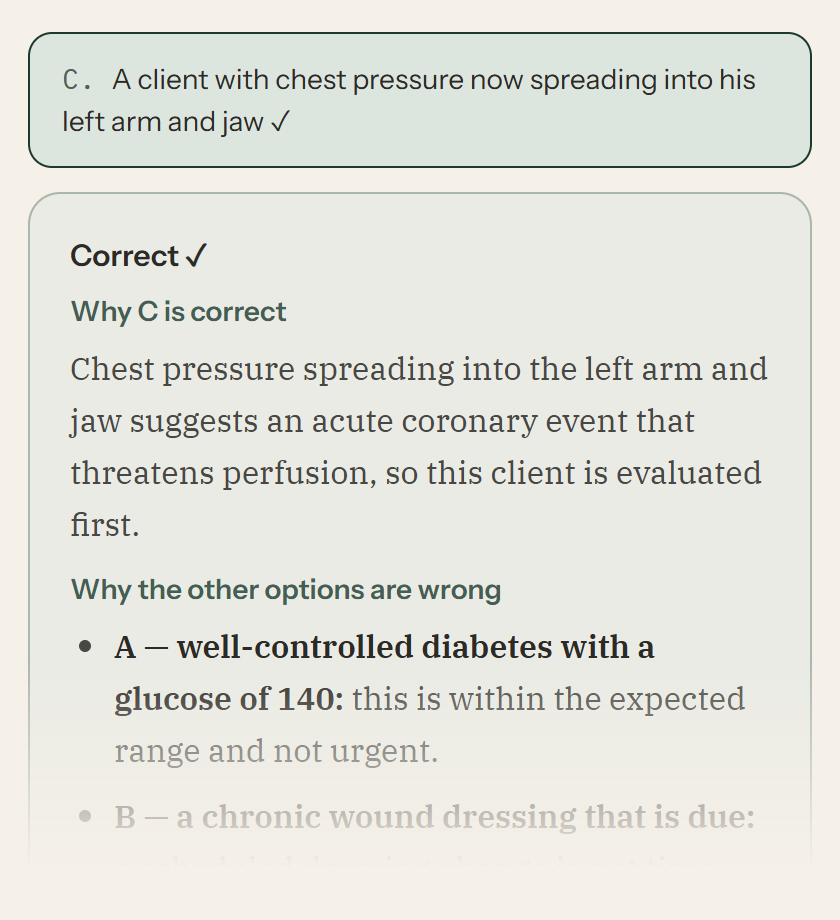
Why the answer is right — then each wrong option explained, one by one. more ▾less ▴
Every rationale now follows one clear shape: first, why the correct answer is right — then “Why the other options are wrong”, taking each choice in turn and naming exactly what it is or when it would be the right pick. No more digging through one long paragraph after a tough question. Thank you to the students whose reports sparked this!
- Improved
Every question included — practice, all five mock boards, and the diagnostic. more ▾less ▴
This covers everything: all 11,800+ questions across practice, all five mock boards, and the diagnostic. Each rewrite was checked against the original so the facts — and the correct answers — stayed exactly as verified.
- Improved
July 10, 2026
The right emails at the right time
- New
Welcome, receipt, renewal heads-up, and exam-week checklist emails. more ▾less ▴
BoardPal now sends the emails that matter: a welcome when you join, a receipt when your payment is approved, a heads-up before your access ends, and an exam-week checklist two days before your boards. Each one exists so you never miss something important — nothing noisy.
- Improved
Day 1 of a new plan now ends with real questions answered. more ▾less ▴
Day 1 of a new study plan now pairs the intro lessons with a lighter first topic, so your first day ends with real questions answered — not just reading.
- Improved
Plans & Pricing previews the official plans arriving after beta. more ▾less ▴
Plans & Pricing now previews the official plans that arrive after beta, so you can see where BoardPal is headed. Beta access stays the same one-time ₱350 while spots last.
- Improved
Mock Boards 1 and 2 got a question-by-question quality pass. more ▾less ▴
Mock Boards 1 and 2 got a question-by-question quality pass — clearer stems and tighter answer choices — part of our ongoing question review.
- New
July 10, 2026
Flashcards: pick your own mix of topics
- New
Build flashcard sessions from any mix of topics you choose. more ▾less ▴
The Flashcards page now has a “Choose topics” builder — tick any mix of decks, a whole subject in one tap or single decks across subjects (Pedia + OB, say), and review just those. It remembers your last picks for next time.
- Improved
Cleaner deck library with search. more ▾less ▴
The deck library is easier to scan: compact rows, subjects collapsed with their due counts on top, and a search box so you can jump straight to a deck like “insulin” or “labor”.
- New
July 9, 2026
Change your rest days anytime
- New
Add or change rest days on your plan and it rebalances around them. more ▾less ▴
You can now change your rest days right from the Study Plan page — no need to reset and rebuild. Pick a preset or your own days, hit Save, and your unfinished topic work respreads around them automatically. Everything you've already completed stays exactly where it is.
- New
July 9, 2026
Study plans now fit your days
- Improved
Plans are sized to about 4 hours a day — no more impossible days. more ▾less ▴
New study plans are built around a realistic daily budget of about four hours. A shorter timeline now means fewer questions per topic — never a skipped topic — instead of impossible 200-question days. Mock boards scale with your plan length too (a two-week plan gets one final benchmark instead of ten days of mocks), and the day before your exam always stays light: just your mistakes, then rest.
- Improved
Task time estimates are now honest, based on real answering pace. more ▾less ▴
Time estimates across the app are now calibrated to how long questions and flashcards really take our students. Some tasks will show a longer estimate than before — nothing got longer, the number just got honest.
- Improved
Existing plans are untouched, with a one-time offer to rebalance. more ▾less ▴
Plans you already built are not changed. If yours came from before this update, you'll see a one-time offer on the Study Plan page to rebalance it to the new pacing — everything you've completed carries over, and your old plan stays restorable.
- Improved
July 9, 2026
Rebuilt your study plan by mistake? Undo it
- New
Replaced your study plan by accident? You can now restore it. more ▾less ▴
Building a new study plan (or tapping Reset) no longer means losing your old one — the previous plan is kept safe, ticks and all, and you can restore it from the Study Plan page with one tap. Resetting now also asks first, and points you to Rebalance when all you need is to respread the days you missed. Thank you to the student who reported this!
- New
July 8, 2026
Build a custom practice set
- New
Random practice sets from the exact topics you pick — across sections too. more ▾less ▴
You can now pick the exact topics you want in a random practice set — tick any mix of topics, across sections too, and choose how many questions. Your set draws evenly across the topics you picked. Open Practice and tap “Build a custom set”, or start from any topic or section and adjust from there. The usual choices (new or missed questions, Practice or Exam mode) all work with it, and unfinished custom sets resume like any other. Thank you to the student who suggested it!
- New
July 8, 2026
More beta spots — by popular demand
- Improved
We opened more beta spots, same ₱350 founding price. more ▾less ▴
The founding beta filled up, and a lot of you asked us to open more, so we did. Full access is still a one-time ₱350 for 2 months, the same founding price, timed to carry you through the August 2026 boards. Grab a spot under Plans & Pricing while they last.
- Improved
July 7, 2026
Move the cross-out button to your left hand
- New
Choose which side the ✕ cross-out button sits on — handy for lefties. more ▾less ▴
You can now choose which side the ✕ cross-out button sits on. Left-handed? Move it to the left so your hand doesn't cover the other choices while you rule options out with a pen. Set your default in Profile → Study preferences, or switch it any time right on the exam screen, next to the highlighter. It stays on the right unless you change it. Thank you to the left-handed student who suggested it!
- New
July 6, 2026
Flashcards for everyone & a clearer Flashcards page
- New
Free plan: 5 flashcards a day, personalized to your weak spots. more ▾less ▴
The free plan now includes 5 flashcards a day — cards due for review come first, then new ones from the topics your practice shows you're weakest in. Beta unlocks all 3,366 cards with a goal you set yourself.
- Improved
A simpler Flashcards page with one clear starting point. more ▾less ▴
The Flashcards page now leads with one clear action — “Start today's session” — with your goal progress right above it. Reviewing by subject and browsing individual decks are still there, just quieter.
- Improved
Cards are labeled Due or New, and you see when the due pile clears. more ▾less ▴
During review, each card is labeled Due or New, and you'll see the moment your due pile is cleared — so it's always obvious that scheduled reviews come first.
- Fixed
The home screen flashcards task opens the same session as the calendar. more ▾less ▴
The flashcards task in Today's Plan on your home screen now opens the same weak-spot session as the Study Plan calendar.
- New
July 6, 2026
Random practice from one whole section
- New
Random practice sets from one whole NP section. more ▾less ▴
You can now start a random practice set from one whole NP section — every topic in that component, shuffled together — instead of choosing between a single topic and the all-section mix. Open Practice and tap the “Random set” button beside a section's name. The usual choices (how many questions, new or missed, Practice or Exam mode) all work with it, and the set draws evenly across the section's topics. Thank you to the student who suggested it!
- New
July 5, 2026
The mock exam clock stays in sight
- Fixed
The mock exam timer now stays visible while you answer. more ▾less ▴
During mock exams, the timer and progress bar now stay pinned to the very top of your screen the whole time you're answering — before, the navigation bar covered them as soon as you scrolled into the questions. The 30, 10, and 5-minutes-left alerts appear in that pinned bar too, so you'll see them no matter where you are in the section. Thank you to the student who suggested it!
- Fixed
July 5, 2026
Flashcards: your goal, your pace
- New
Set your own daily flashcard goal in Profile. more ▾less ▴
You can now set your own daily flashcard goal — anywhere from 5 to 100 cards — in Profile → Study preferences (or tap Adjust next to the meter on your Decks page).
- Improved
No more daily flashcard cap — keep going past your goal any time. more ▾less ▴
The old 20-new-cards-a-day ceiling is gone. Your goal is a target to reach, not a wall: finish a session and tap “Keep going” for another set, for as long as you want to study.
- New
Scheduled flashcards now start with your weakest topics. more ▾less ▴
Flashcard sessions opened from your study plan now lead with the topics your practice shows you're weakest in. Cards you've already started keep their exact spacing — only the order new cards arrive in is personalized.
- New
July 5, 2026
Deeper readiness insights & a faster app
- New
Richer Performance insights: a likely range, recent form, and how you compare. more ▾less ▴
Your Performance page goes deeper on where you stand: a likely score range instead of a single number, your recent form over the last two weeks (with trend arrows), how consistent your mock scores are, and how you compare to other takers by percentile — an honest, fuller picture of your readiness.
- Improved
Faster leaderboards and pages. more ▾less ▴
Leaderboards and several pages now load much faster.
- Fixed
CROSS / Foundations readiness now reflects your answers. more ▾less ▴
Your CROSS (Foundations) subject readiness now fills in properly — answers on Foundations topics are credited to the right subtopics, so that row is no longer stuck empty.
- Improved
The official PNLE exam date is pre-filled when you set up your plan. more ▾less ▴
When you set up or adjust your study plan, the official PNLE exam date is now pre-filled for you — verified against PRC's announcement.
- New
The diagnostic autosaves, and finished ones appear in History. more ▾less ▴
Your diagnostic now autosaves as you go, so stepping away won't lose your progress — and finished diagnostics now appear in your History alongside your practice sets and mock boards.
- Improved
Faster ways into practice, and a calmer upgrade flow. more ▾less ▴
Quicker ways to jump straight into practice from your home screen, and a clearer, calmer flow when you upgrade — including how to send your payment and when to expect approval.
- Fixed
Signing up with an existing email now guides you to log in. more ▾less ▴
Signing up with an email that already has an account no longer gets stuck retrying — you're guided to log in instead.
- New
July 5, 2026
Your mock board rank, right on your home page
- New
Your mock board rank now shows on your home page. more ▾less ▴
Your home page now shows your mock board standing beside your practice rank — your place on the latest mock you've taken. On the public leaderboard, that's your rank (like #4 of 31). Staying private? You still get your own Top X% among everyone who's taken that board — visible only to you. Thanks to the student who suggested this!
- Improved
Each home-page standing tile now opens the right leaderboard. more ▾less ▴
Both standing tiles on your home page now land you on the right board — the practice tile opens the weekly practice rankings, and the mock tile opens that mock's all-time topnotchers.
- Fixed
Reviews of since-revised questions no longer look contradictory. more ▾less ▴
Reviewing a question we've revised since you answered it no longer looks contradictory — the review now says plainly that the choices changed and whether your recorded answer was right.
- New
July 2, 2026
Clearer names, clearer numbers
- Improved
Nav names now match the pages they open. more ▾less ▴
One name per feature, everywhere: the nav item that opens your Vault now says Vault, and your schedule page is titled Study Plan to match the menu — no more clicking "Review" and landing on a page called something else.
- Improved
Your projected rating now matches on every page. more ▾less ▴
Your projected rating now tells one story across the app: the dashboard, Performance, and Profile all unlock it at the same point and show the same number — and while it's locked, they tell you exactly how many answers away you are.
- Improved
The Vault now opens with a summary, not a live question. more ▾less ▴
The Vault now opens with a summary of what's due and how clearing works — you start the run when you're ready, instead of landing inside Question 1.
- Improved
Mock Boards now show your progress on each board. more ▾less ▴
Mock Boards now show where each board stands — Not started, In progress (with which day and section you're on, and a Continue button), or your scores.
- Improved
Ticking off a mock task explains that only taking the mock records a score. more ▾less ▴
Ticking a mock task off your study plan now explains that scores are recorded only by taking the mock — so your mock counters never look like they lost an attempt.
- Improved
A clearer jump grid, clearer resuming, and the star renamed "Save to Vault". more ▾less ▴
In practice sessions, answered questions in the jump grid are now clearly filled in, resuming tells you it opened your first unanswered question, and the post-answer star is now called "Save to Vault" so it can't be confused with the flag.
- New
A show-password toggle, plus our published Terms and Privacy Policy. more ▾less ▴
The login page now has a show-password toggle, and our Terms of Service and Privacy Policy are published — linked from the sign-up page and the site footer.
- Fixed
A past mock reopens graded exactly as it was when you took it. more ▾less ▴
Reopening a past mock board or diagnostic now grades it exactly as it was when you took it — so if a question is corrected later, your recorded score and review stay as they were.
- Improved
Tied scores share a rank, and each score shows the date it was set. more ▾less ▴
On the Mock Boards leaderboard, tied scores now share the same rank (PRC-style), each score shows the date it was set instead of an item count, and you can see your standing as #X of N.
- Improved
July 2, 2026
Smoother schedule editing
- Improved
Moved schedule tasks now land where you can see them. more ▾less ▴
Moving a task to another day now drops it at the bottom of that day — right where you're looking — with a brief highlight so you never lose track of it.
- New
Undo a schedule move with one tap. more ▾less ▴
After you move a task, a small confirmation appears with one-tap Undo — plus a gentle heads-up if that day is getting heavy or falls on one of your rest days.
- Improved
Rebalance now balances by study time. more ▾less ▴
Rebalance now spreads your remaining topics by estimated study time instead of task count, so every day carries a similar amount of work — and your final-review days stay protected at the end of your plan.
- Fixed
Two-day mock boards can no longer be scheduled out of order. more ▾less ▴
Two-day mock boards now stay in order — Day 2 can no longer be scheduled before its Day 1.
- Improved
July 2, 2026
More of your study counts, plus tidier situations
- Fixed
Mock boards and the diagnostic now count as studying on your Progress. more ▾less ▴
Mock boards and the diagnostic exam now both count as a studied day on your Progress calendar and weekly summary — matching your home-screen streak — so a day you spent on either no longer looks like a missed day.
- New
Tap Hide on a mock situation to stop it repeating on every question. more ▾less ▴
In mock boards, you can now tap Hide on the situation box so it stops repeating in full on every question of a case. It collapses to a single line on the follow-up questions — and always shows in full on the first question of each new case. Tap Show anytime to bring it back.
- Improved
Hardened hundreds more too-easy questions across 18 topics. more ▾less ▴
Hardened hundreds more too-easy questions across 18 topics, tightening the answer choices so they better match the real PNLE — part of our ongoing question-quality review.
- Fixed
July 1, 2026
Cleaner select-all-that-apply questions
- Improved
Hundreds of select-all-that-apply questions made less predictable. more ▾less ▴
Improved hundreds of select-all-that-apply questions across the bank: the answer combinations are less predictable, the number of correct statements varies more naturally, and the formatting reads cleaner — part of our ongoing question-quality review.
- Improved